SSO ID Login | Rajasthan SSO Login & Portal Guide 2026
Rajasthan SSO, also called Rajasthan Single Sign-On or RajSSO, which provides one digital identity to access all rajasthan government services online. The official portal is sso.rajasthan.gov.in. It is developed and hosted by the Department of Information Technology & Communication (DoIT&C), Government of Rajasthan.
In this guide we covers SSO ID login, SSOID recovery, password reset, password rules, account lockouts and security precautions.
Note: This is an informational guide and is not the official Rajasthan SSO website. Portal options may change, so confirm current details on the official .gov.in portal.
What Is Rajasthan SSO ID?
SSO ID is the digital identity used to sign in to Rajasthan’s Single Sign-On system. RajSSO allows users to access participating government applications through one account and not created each separate accounts for each service.
This platform supports different user groups, including:
The portal is available in English and Hindi.
How to login SSO ID
If you have already SSO ID, follow these steps to log in.
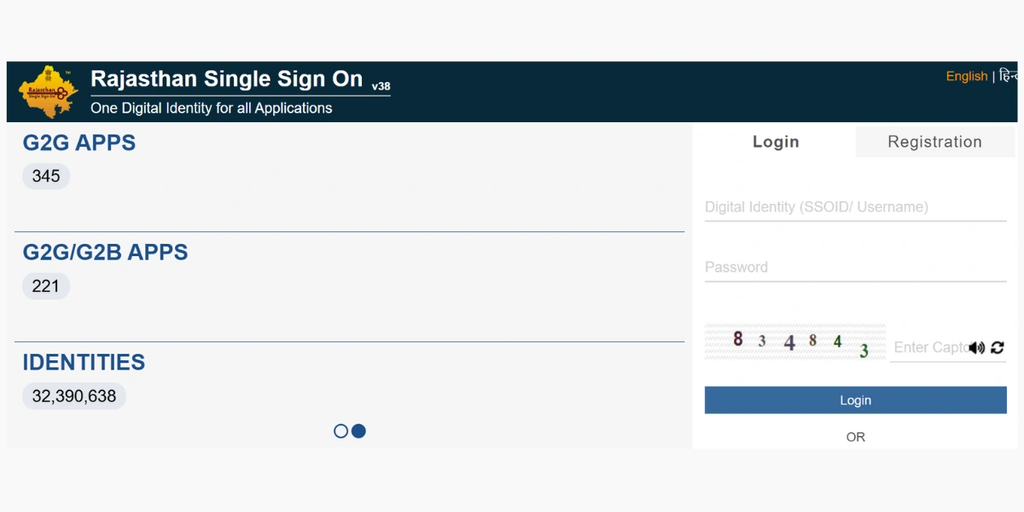
Step 1: Open the Official SSO Website
Go to: sso.rajasthan.gov.in
Open the official Rajasthan Single Sign On portal and select the Login option.
Step 2: Enter Your SSOID or Username
Add your Digital Identity (SSOID/Username)
Enter the SSOID associated with your account.
The standard login page identifies SSOID/Username as the login credential.
Step 3: Enter Your Password
Enter Your password associated with your SSO account.
Check uppercase and lowercase letters, numbers and special characters if the password is rejected.
Step 4: Enter the Captcha
Enter the 6-digit captcha shown on the login page.
Step 5: Select Login
After entering your SSOID, password and captcha, select Login.
If the credentials are correct, you can access the SSO dashboard and available applications.
Who Can Use SSO ID Login?
Rajasthan SSO can be used by different types of users who have a valid SSO ID. The main user categories include:
This applications is available after login and service depend on user account type.
Purpose of SSO ID Login
The main purpose of SSO ID Login is to give access people to all government schemes and services in one place.
After signing in, you can:
These services available after login and depend on the your account type connected to the account.
SSO ID Login Problems and Solutions
|
Problem |
What to do |
|---|---|
|
Forgot SSOID |
Use I Forgot my Digital Identity (SSOID) |
|
Forgot password |
Select I Forgot my Password |
|
Account locked |
Wait for the lock period or contact the official helpdesk |
|
Wrong password |
Check your credentials or reset the password |
|
Login page not loading |
Refresh the page or try another browser |
|
Captcha issue |
Enter the current captcha displayed on the page |
|
Recovery not working |
Use another available recovery method or contact the helpdesk |
Conclusion
SSO ID Login allows users to access connected Rajasthan government applications through one digital identity. For login, you normally need your SSOID/Username, password and captcha. If you forget your SSOID or password, use the recovery options provided on the official portal. For registration methods, helpdesk details and available services, check sso.rajasthan.gov.in because portal options can change over time.